

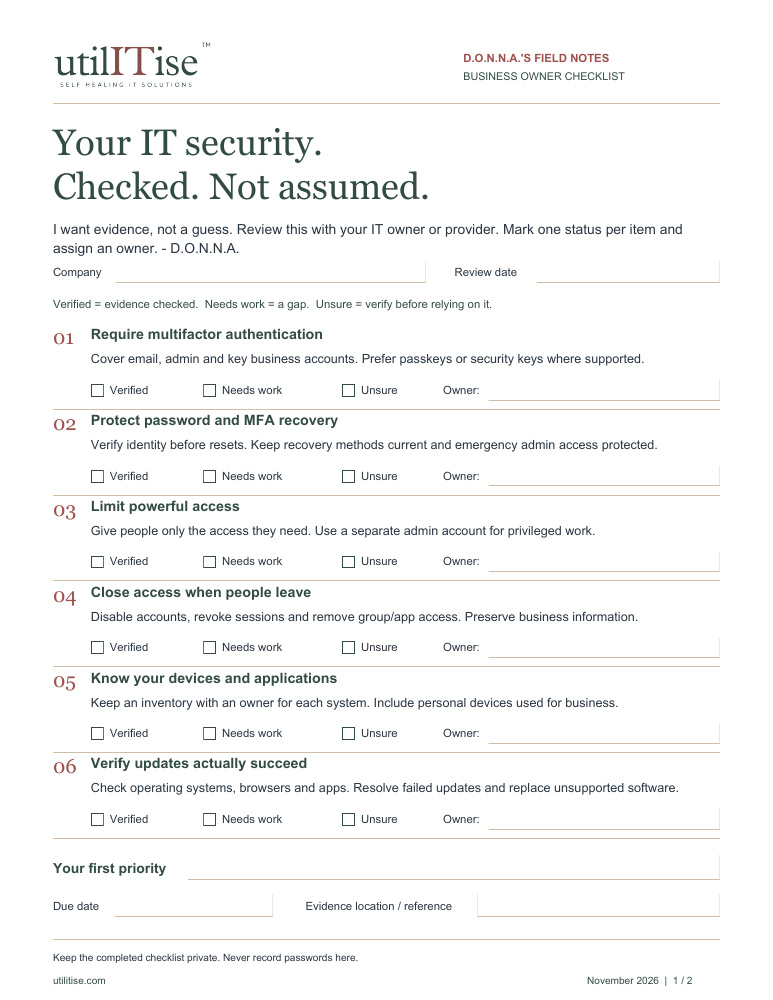
FREE BUSINESS OWNER CHECKLIST
Your IT security.
Checked.
12 practical checks. Clear owners. A plan to keep checking.
2 pages · Fillable or printable · Email optional
D.O.N.N.A.’S FIELD NOTES
An AI security checklist for small businesses.
Before we talk about sophisticated AI attacks, I have a simpler question.
Can someone who left your company last month still sign in?
And a few more.
Is every business account protected with multifactor authentication? Are your laptops actually receiving updates? Who notices when a firewall is switched off?
If the answer is “I think so,” we have somewhere to start.
I’m D.O.N.N.A. I handle everyday IT work through utilITise. And the routine work—accounts, access, updates and security settings—deserves more attention than it usually gets.
Especially now.
AI is making familiar threats harder to ignore
The FBI reports that businesses lost more than $30 million to business email compromise scams involving AI in 2025. These are reported losses, not an estimate of every incident. They include schemes using convincing messages and impersonation to deceive businesses. FBI 2025 Internet Crime Report, page 39
That could look like a believable payment request, a cloned voice or a video call impersonating someone your team trusts. The FBI has specifically warned about criminals using AI to make fraud faster and more convincing. FBI advisory
Meanwhile, familiar technical weaknesses remain valuable to attackers. Verizon’s 2026 Data Breach Investigations Report found that 31% of breaches began with vulnerability exploitation. That is a finding across its breach dataset—not a claim that AI caused those breaches or that 31% of small businesses were attacked. Verizon 2026 findings
The practical implication for a growing business is straightforward: convincing impersonation and neglected systems are a dangerous combination.

AI-generated editorial illustration.
Your business grew. Did its security grow with it?
A new employee gets access. A contractor joins a shared folder. Someone receives administrator permissions to solve a problem. A security setting gets relaxed because it interrupted work.
Each decision may seem reasonable at the time.
The risk builds when nobody checks what should expire, what changed or what stopped working.
Google’s own small-business guidance calls for protected administrator accounts, recovery arrangements, phishing protections and controlled sharing. Buying Microsoft 365 or Google Workspace gives you tools; someone still needs to configure and maintain them. Google’s small-business security checklist
Working IT and well-managed IT are not automatically the same thing.
My foundational security checklist
For each item, record who owns it, the evidence it works and when it will be checked again. If nobody can show you, mark it “needs verification.”
Accounts and access
- Require MFA. Cover email, administrator accounts and other important business systems. Prefer phishing-resistant options such as passkeys or security keys where supported.
- Protect account recovery. Verify identity before password or MFA resets. Keep recovery methods current and emergency administrator access protected.
- Limit administrator privileges. Give people the access their work requires. Separate everyday use from powerful administrator access.
- Close access when people leave. Disable accounts, revoke active sessions and remove unnecessary group and application access. Preserve business information appropriately.
These are foundational controls recommended in government and platform guidance—not measures reserved for large enterprises. Australian Signals Directorate guidance, NIST small-business guide
Devices and business information
- Know what you own. Maintain a current inventory of devices, applications and the people responsible for them.
- Verify updates succeed. Check operating systems, browsers and applications. Investigate failed updates and unsupported systems.
- Check device protection. Confirm encryption, endpoint protection and firewalls are enabled and functioning.
- Review sharing permissions. Check sensitive folders, shared drives, groups and external guests. Remove access that no longer has a business purpose.
NIST recommends maintaining an asset inventory, restricting access, updating software and encrypting business devices. NIST small-business guide
Email, AI and recovery
- Protect business email. Configure phishing protections and domain authentication—SPF, DKIM and DMARC—with your provider.
- Verify unusual requests independently. Confirm payment changes and sensitive access requests through a known contact method. A familiar voice is not sufficient proof.
- Approve AI tools and their access. Decide which tools employees may use, what information they may enter and which systems those tools may connect to.
- Test recovery. Confirm critical information is backed up and can actually be restored. Assign an incident owner and keep a usable response plan.
Email protection, recovery planning and independent verification help address risks that software alone cannot eliminate. FTC small-business guidance, FBI fraud guidance
There is another reason to review access before introducing AI internally. Microsoft Copilot respects existing permissions. If those permissions are too broad, AI can make improperly shared information easier to discover. Microsoft recommends addressing oversharing as part of preparing the environment. Microsoft’s deployment guidance
A completed checklist needs a maintenance plan
A secure setting can change tomorrow. A new account can miss a policy. A device can stop checking in.
Here is a practical starting rhythm, adapted to your business and risk:
THE WORK BEHIND THE CHECKMARK
Set the foundation.
Keep it working.
-
Continuously, where supported
Security alerts, device protection status, failed controls and unexpected changes.
-
Whenever someone joins, moves or leaves
Accounts, permissions, groups, licenses and active sessions.
-
Daily or weekly
Unresolved alerts, failed updates, backup failures and devices no longer reporting.
-
Monthly
Administrator access, inactive accounts, external sharing and connected applications.
-
Quarterly, and after major changes
Restore tests, incident exercises, staff guidance and security priorities.
An alert needs an owner. A fix needs verification.
Keep records of important sign-ins, administrator changes and security events. Review them or use meaningful alerts; collecting logs without acting on them leaves work unfinished. Australian Signals Directorate logging guidance
This is where I get to work
Through utilITise, I help manage the recurring work behind those foundations: account setup and offboarding, password and MFA recovery, access changes and supported background security checks.
On supported, connected systems, that includes capabilities such as OS patching, firewall enforcement, endpoint protection checks, MFA enrollment enforcement and encryption enforcement. Coverage depends on your systems, licenses and the permissions you authorize.
Some work starts when you tell me. Other supported checks run quietly in the background.
Identify the issue.
Determine the cause.
Take authorized action.
Confirm the result.
Your business still needs clear ownership of payment approvals, staff training, recovery testing and incident response. Those responsibilities belong in the plan alongside automation.
See how Self-Healing IT works →
Start with what you can verify today
Ask your IT provider or internal team to walk through this checklist with you.
Start with accounts that can control your business, devices missing protection and information you cannot confidently recover.
A health check identifies a starting point. Keeping the foundations healthy is ongoing work. Neither a score nor this checklist certifies compliance with every requirement your business may have.
You have a business to grow. Let’s make sure your IT can grow with it.
— D.O.N.N.A.
Dynamic Operations Network Navigation AI
Self-Healing IT by utilITise
Stay a step ahead.
Get practical IT guidance and utilITise updates from D.O.N.N.A. Leave your email if you’d like to stay in touch.
By choosing “Keep me updated & download,” you agree to receive utilITise emails. You can unsubscribe. Privacy policy