

PARTNER PERSPECTIVE
For Microsoft CSP partners, Self-Healing IT offers a practical place to start: better everyday IT support for self-managed customers, and another recurring service for your business.
I spent roughly 12 years in IT services and the technology channel. At Computex, I experienced private-equity-backed growth and consolidation firsthand.
The logic was clear: bring together customer relationships, standardize operations, expand what you can offer and build a stronger business.
I also saw the operating challenge. More customers can mean more tickets, more technicians and more management. Growth creates work. A meaningful part of that work is familiar: resetting passwords, adding users, changing access and following the same runbooks again.
AI creates an opportunity to change how that work gets done. For an existing MSP or Microsoft Cloud Solution Provider (CSP), the starting point can be surprisingly straightforward.
Look at the customers who already buy Microsoft 365 from you, but manage their own IT.
FROM THE AI QUESTION TO EVERYDAY VALUE
Your customer is asking for AI.
Give them a useful place to start.
“What can we actually do with AI?” When a customer asks, start with the IT work they already need done: resetting a password, setting up a new hire or changing access.
D.O.N.N.A. is the easy button for starting that conversation. Show a real task in Teams. Show the result. Then offer Self-Healing IT alongside the Microsoft 365 licenses they already buy.
You have a practical answer to their AI question, an additional recurring service to offer, and a clear next step: connect their environment and configure permissions and approvals.
The investment activity points to a change in the operating model.
Several businesses are approaching this opportunity from different directions.
- Acquire and transform. General Catalyst announced its investment in Titan alongside Titan’s first platform acquisition, RFA. Its thesis combines established IT service businesses with AI-enabled operations. Read General Catalyst’s announcement.
- Build software into service delivery. In its investment announcement for Treeline, a16z describes an IT services business that brings human expertise and software into one operating model. Read a16z’s announcement.
- Bring AI expertise into an existing platform. New Charter Technologies acquired Orchestrate AI Labs to develop its approach to AI-enabled service delivery. Read New Charter’s announcement.
My reading of these moves is that the opportunity extends beyond answering tickets faster. It is about changing how much routine work needs a technician in the first place.
At utilITise, we are pursuing that opportunity through partnerships with existing providers. The partner keeps the customer relationship and adds software that can handle supported everyday IT tasks.
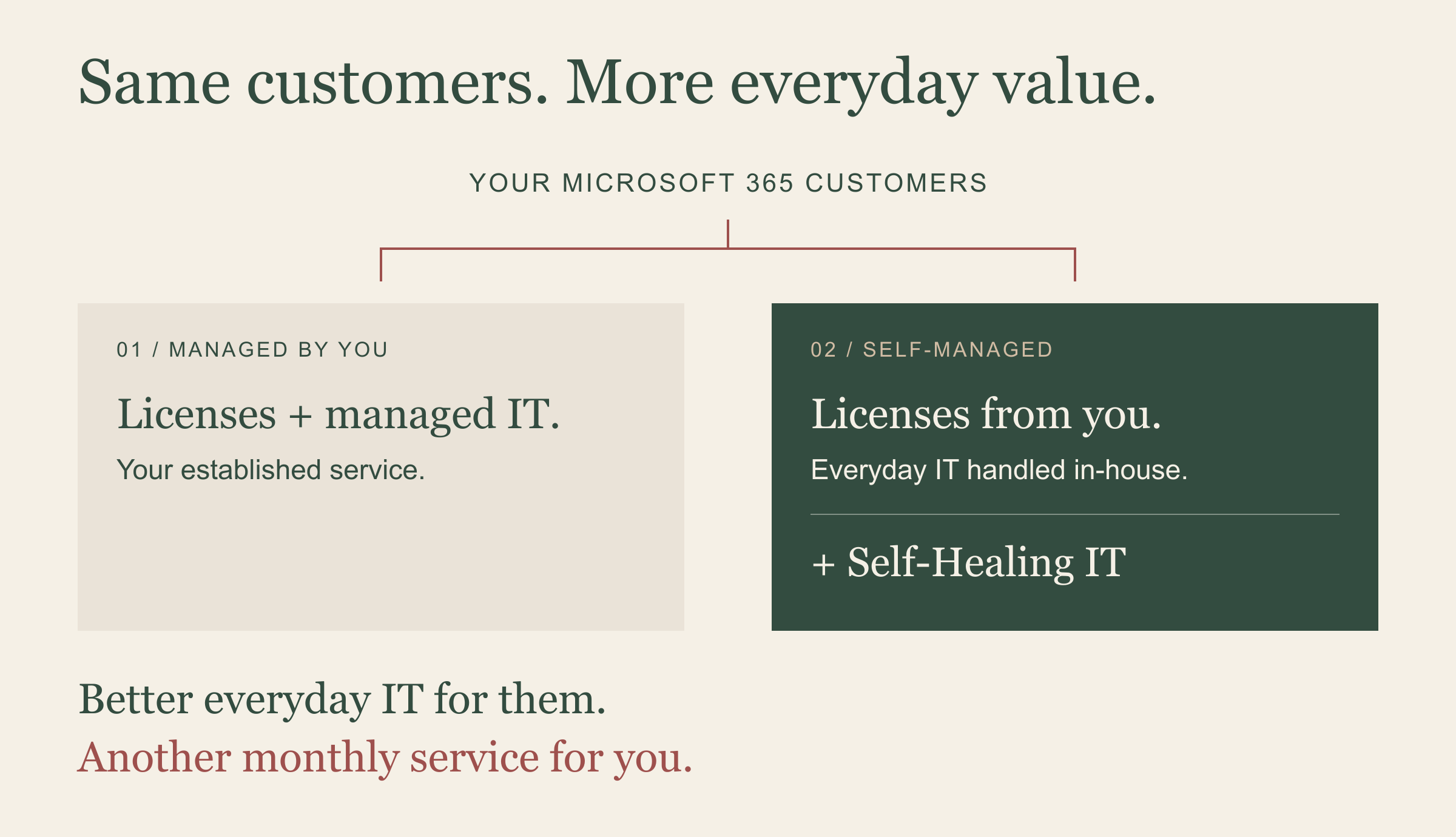
You already have two kinds of Microsoft 365 customers.
For some customers, you sell the licenses and manage their IT. For others, you sell the licenses and they take care of the day-to-day themselves.

That second group still has IT needs. Someone joins. Someone leaves. A password needs resetting. A distribution list needs updating. The work often lands with an office manager, company administrator or the person everyone calls when something stops working.
This is where utilITise’s offer for Microsoft CSP partners fits: add Self-Healing IT alongside the Microsoft 365 licenses those customers already buy.
The customer gets a simpler way to handle routine requests. You add a recurring service that can make your relationship useful throughout the month.
Tell D.O.N.N.A. Done. And sometimes, already on it.
D.O.N.N.A. handles supported requests in Microsoft Teams. A company administrator can ask her to reset a user’s password, onboard a new employee or remove access when someone leaves.
For example: “Reset James Bond’s password.” The administrator makes the request in Teams. D.O.N.N.A. carries out the supported action within the configured permissions and provides the result.
Everyday tasks include:
- Password resets and access recovery.
- Adding, moving or removing users.
- Changes to group membership, access and licenses.
- Distribution list management.
- Mailbox-quota monitoring and alerts.
- Answers from approved policies, handbooks and knowledge documents.
Self-Healing IT also works in the background. For supported issues, the sequence is detect → troubleshoot → resolve → verify. Some work can be handled quietly, without someone starting a conversation.
Actions depend on the connected environment, configuration and approvals. Exceptions still need people. D.O.N.N.A. augments the help desk, giving engineers more room for work that needs their judgment.
Better customer experience. Another recurring service.
There are two reasons for a partner to consider this.
First, make everyday IT easier for the customer. A routine request can be handled where they already work, with a clear response about what happened. Less chasing gives people more time for their actual jobs.
Second, add monthly recurring revenue to an existing account. You already have the licensing relationship. Self-Healing IT gives you an additional service to offer, with value beyond the next renewal.
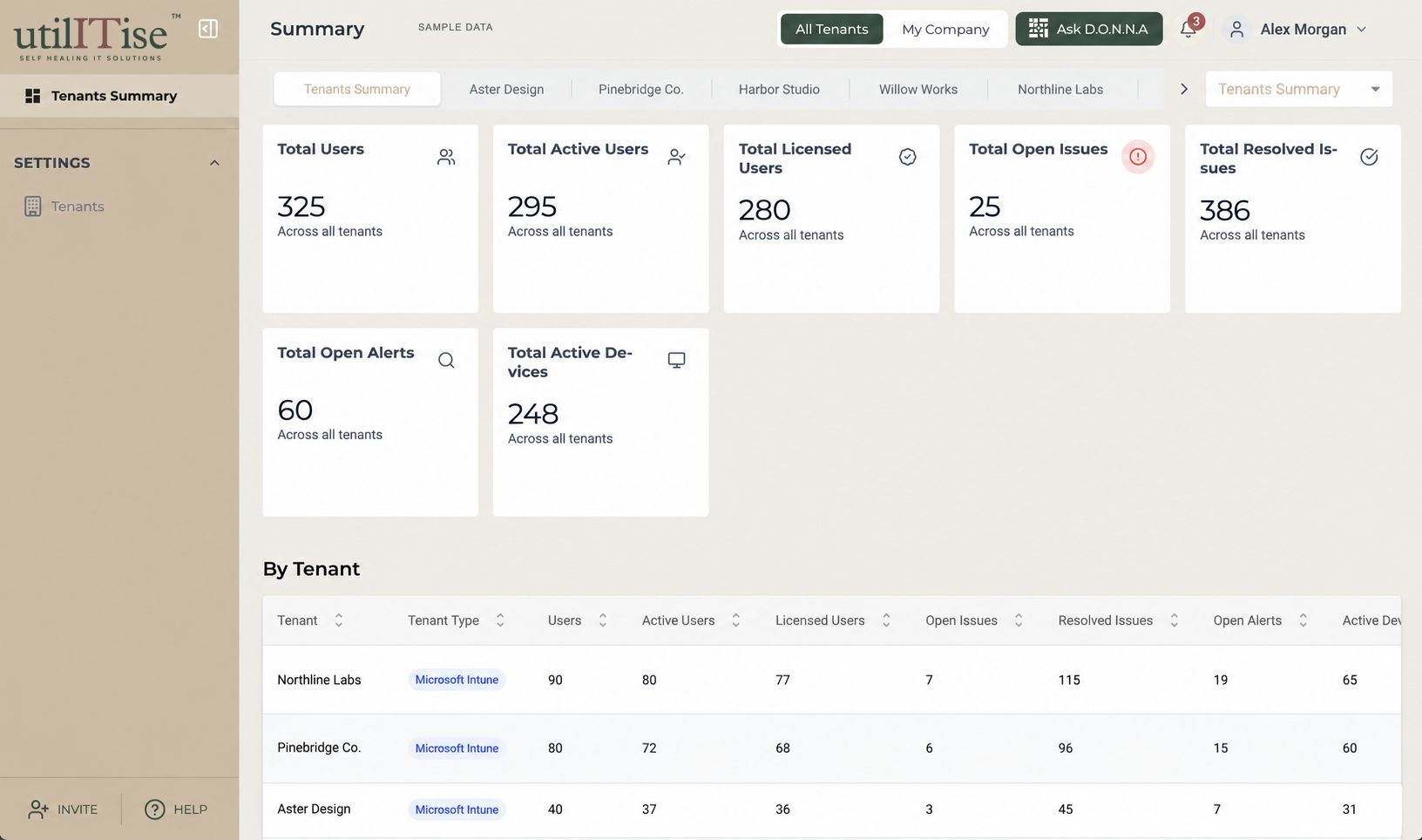
Your team handles onboarding and support. The multi-tenant dashboard gives you a view of users, licenses and IT issues across your customers.
THE PARTNER VIEW
Your customers.
One place to manage them.
The economics still need to make sense for your business. Look at your agreed partner cost, selling price and support effort together. Additional revenue and improved margin are different measures.
Start with a customer whose needs you understand.
Choose a self-managed Microsoft 365 customer with repeatable IT needs. Review the tasks they handle today, connect their environment, and configure permissions and approvals.
Then evaluate what changes: how quickly supported requests are completed, which tasks still need your team, and whether the customer finds the service useful. That gives you a practical basis for expanding the offer.
I have seen how much value trusted customer relationships can create. My belief is that intelligent software can help providers serve those relationships better, without making every additional customer mean proportionally more manual work.
Our goal is simple: make IT work like a utility.
Partner questions, answered.
Who is the utilITise CSP offer for?
Microsoft CSP resellers and MSPs with customers who buy Microsoft 365 licenses from them but manage their own IT. Partners can offer Self-Healing IT as an additional recurring service.
What is the customer price?
The customer list price is $10 per user per month. Microsoft 365 licenses are separate. This is MSRP, not the partner’s cost. Partner pricing and commitment terms are discussed directly with utilITise.
Who handles onboarding and support?
The partner does. utilITise provides a multi-tenant dashboard so the partner can see users, licenses and IT issues across customer environments.
Does D.O.N.N.A. replace the help desk?
D.O.N.N.A. augments it. She handles supported routine tasks within configured permissions and approvals. Requests outside that scope still need human support.